
_(2).png)
_(2).png)


 445
445
The W-9 form is typically used by U.S. taxpayers to provide their TIN to others who need it for tax purposes (like employers or contractors).
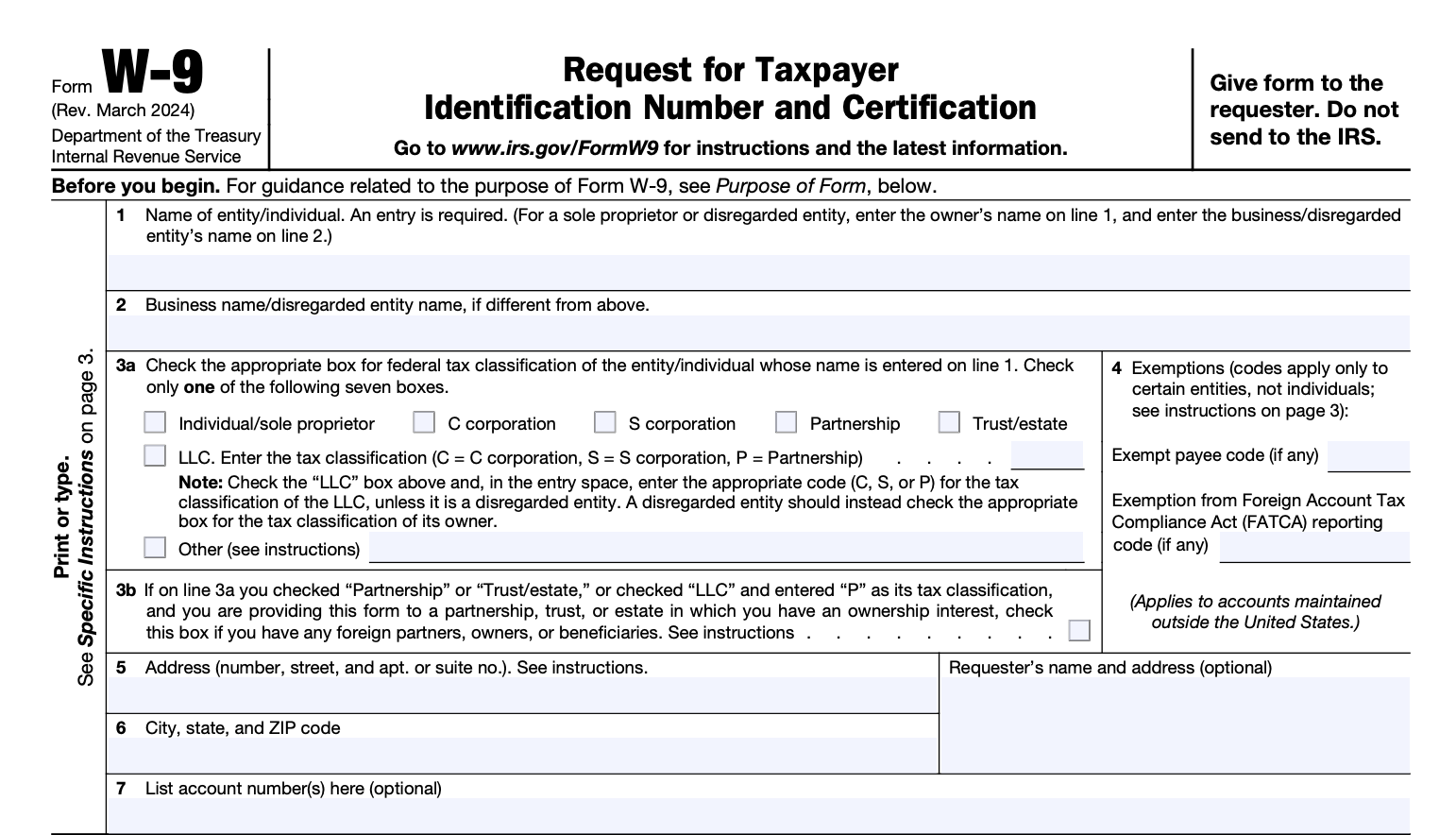
To complete a W-9 form, follow these steps:
-
Provide your name and business name (if applicable):
- Line 1: Enter your full name (if you’re an individual) or your business name (if you’re completing the form for a business).
- Line 2: If applicable, enter the business name or "doing business as" (DBA) name.
-
Choose your tax classification:
- Line 3: Check the appropriate box to indicate whether you’re an individual/sole proprietor, C corporation, S corporation, partnership, trust/estate, limited liability company (LLC), or other.
-
Provide your address:
- Line 4: Enter your business address (if applicable), or personal address if it’s for individual use. This is where the IRS and our Schools will send your tax documents and payments.
-
Enter your taxpayer identification number (TIN):
- Line 5: If you are an individual, this will typically be your Social Security Number (SSN). If you’re a business, it will be your Employer Identification Number (EIN).
-
Certify your information:
- Line 6: Sign and date the form. By signing, you certify that the information provided is correct and that you are not subject to backup withholding.
What is DBA
The DBA (Doing Business As) section on the W-9 form is for individuals or businesses that operate under a name other than their legal business name. In this section, you write the name that your business or operation is commonly known by, which may differ from your legal name or business entity name.
Here’s a breakdown of when and how to fill it out:
-
If you are a sole proprietor or individual operating under a business name:
- Line 2: If your business has a "doing business as" name (a trade name or fictitious business name), this is where you would list that name. For example, if your name is John Doe but you operate a business called Doe’s Handyman Service, you’d write “Doe’s Handyman Service” in the DBA field.
-
If you have a registered business name that is different from your legal name:
-
For instance, if you own an LLC, corporation, or other legal entity, and the business has a name different from the entity's legal name, you would list that "trade name" or "fictitious name" in the DBA section.
-
Example: A corporation called XYZ Enterprises, Inc. might do business under the name XYZ Landscaping. On Line 2, the DBA would be filled out as “XYZ Landscaping.”
-
What’s allowed to be written in the DBA section?
- Business names you’re actively using in your business operations (whether or not it’s registered with the state).
- Fictitious or trade names that you operate under, which are usually filed with your local government or state, depending on your location. In some places, businesses are required to register a DBA if they are not using their legal name.
- The name cannot be a personal name unless you're an individual doing business under your name (in which case, you’d leave it blank or just write your name).
What isn't allowed?
- You can't list a name that is not associated with your actual business. For example, you can’t list an unofficial nickname or a brand you don’t actually operate under.
- You can’t use this section to list an address, phone number, or any information other than a business name you operate under.
Why is this important?
The DBA section helps identify your business and ensures that income is linked to the correct entity or name for tax purposes when you are paid or receive income. The IRS and others will use this information to confirm that the income is being reported under the correct name, which is important for filing taxes.
A couple of examples:
-
Example 1 (Sole Proprietor):
Legal Name: Alice Smith
DBA Name: Alice's Pet Sitting
On Line 1, you’d write Alice Smith.
On Line 2, you’d write Alice's Pet Sitting. -
Example 2 (LLC or Corporation):
Legal Business Name: Green Thumb Landscaping, LLC
DBA Name: Green Thumb Lawn Care
On Line 1, you’d write Green Thumb Landscaping, LLC.
On Line 2, you’d write Green Thumb Lawn Care.
This helps the IRS (and anyone else who needs the form) know which name to associate with the payments or business activity.
More Ways to get assistance:
We offer live vendor support on Zoom every Thursday from 11:00 AM–12:00 PM
For additional resources, visit our Vendor Invoice Support page


